> For the complete documentation index, see [/llms.txt](/llms.txt).

> Source: /docs/capabilities/classify/document-classification

# Document classification

## What is Document classification?

Document classification classifies an input document into one of your user-defined categories. It works across scanned images, photos, and born-digital PDFs, and requires no templates or fine-tuning.

Document classification is a powerful tool for automating document processing pipelines.
For example, if user have bunch of documents and several extraction tasks, user can use document classification to classify the document into different types.
Then, user can use [Information Extract](/docs/capabilities/extract/universal-extraction) by mapping the document type to the appropriate schema for the extraction task.

## Why use Upstage Document classification?

- **Any document**: Robust across scans, photos, and digital documents
- **Flexible taxonomy**: Freely define and update labels to fit your domain
- **No fine-tuning required**: Deploy immediately without templates/training, lowering ops cost
- **Consistent operations**: Use directly for document routing and automation branching

## What models does Upstage provide?

<table><thead><tr><th align="left" width="150px">Alias</th><th>Currently points to</th><th>RPM <a href="/docs/guides/rate-limits#document-classify">(Learn more)</a></th></tr></thead><tbody><tr><td>document-classify</td><td>[document-classify-260904](/docs/models/history#document-classify-260904)</td><td>100</td></tr><tr><td>document-classify-nightly (Experimental nightly model with early access to latest features. Updated frequently and may be removed without notice. Not recommended for production use.)</td><td>\-</td><td>100</td></tr></tbody></table>

## Sending a request in three simple steps

### Add input files to `messages`

You can input a single file, which should be provided as URL or base64 encoded string in the `messages` field, formatted as follows:

```json
{
  "type": "image_url",
  "image_url": {"url": f"data:application/octet-stream;base64,{base64_data}"}
}
```

Requirements for the input file are:

- **Supported file formats:** JPEG, PNG, BMP, PDF, TIFF, HEIC, DOCX, PPTX, XLSX, HWP, HWPX
- **Maximum file size:** 50MB
- **Maximum number of pages per file:** 100 pages
- **Maximum pixels per page:** 200,000,000 pixels. (For non-image files, the number of pixels is determined after converting the file to images at 150 DPI.)

### Set class description in `response_format`

A class description defines the document types to be classified. It can be provided in the `response_format` field.

```json
{
  "type": "json_schema",
  "json_schema": {
    "name": "document-classify",
    "schema": {
      "type": "string",
      "oneOf": [
        {"const": "invoice", "description": "Commercial invoice with itemized charges and billing information"},
        {"const": "receipt", "description": "Receipt showing purchase transaction details"},
        {"const": "contract", "description": "Legal agreement or contract document"},
        {"const": "cv", "description": "Curriculum vitae or resume"},
        {"const": "others", "description": "Other"}
      ]
    }
  }
}
```

- **const**: The exact label string the model must return. Keep it short and consistent (e.g., `invoice`, `receipt`).
- **description**: A natural-language sentences that clarifies each label. Disambiguate between labels and, if helpful, include brief include/exclude examples to improve accuracy.

### Get the response

The response structure mirrors the [OpenAI Chat Completion Object](https://platform.openai.com/docs/api-reference/chat/object).
The classification result is in the `content` of the chat completion message.

```python
result = response.choices[0].message.content
print(result)
```

```json
"invoice"
```

After that, user can use the result to their own tasks such as routing the document to the appropriate extraction task.

## Writing a class description

Follow these recommendations to design labels and descriptions for better accuracy:

- **Clear label names**: Use concrete, non-overlapping names (e.g., `invoice`, `receipt`, `contract`).
- **Differentiating descriptions**: State key criteria in 1–2 sentences and add decision rules for borderline cases.
- **Use examples (optional)**: Brief include/exclude examples help with ambiguous cases.
- **Manage label count**: Too many labels can confuse the model. Start with core labels and expand gradually.
- **Consistent format**: Keep label casing and separators (lowercase, hyphen/underscore) consistent.

Example:

```json
{
  "type": "json_schema",
  "json_schema": {
    "name": "document-classify",
    "schema": {
      "type": "string",
      "oneOf": [
        {"const": "invoice", "description": "Business invoice with seller/buyer info and itemized amounts"},
        {"const": "receipt", "description": "Retail receipt with payment method/change and simple item list"},
        {"const": "contract", "description": "Legal document with parties, clauses, and signatures/stamps"},
        {"const": "cv", "description": "Curriculum vitae or resume summarizing work history and skills"},
        {"const": "others", "description": "Documents not covered by the above labels"}
      ]
    }
  }
}
```

#### Class design restrictions

- The number of classes may have up to 1000 values
- The number of classes must be at least 1.
- Classes with duplicate names are ignored.

## Getting the score of the class

The model returns the class with the highest score.
The score is a value between 0 and 1, where 1 is the highest score.

Users can get the score of the class by using the `additional_values` tool call.

```python
score_dict = response.choices[0].message.tool_calls[0].function.arguments
print(score_dict)
```

```json
{"document_type": {"_value": "invoice", "confidence_score": 1.0}}
```

## Examples

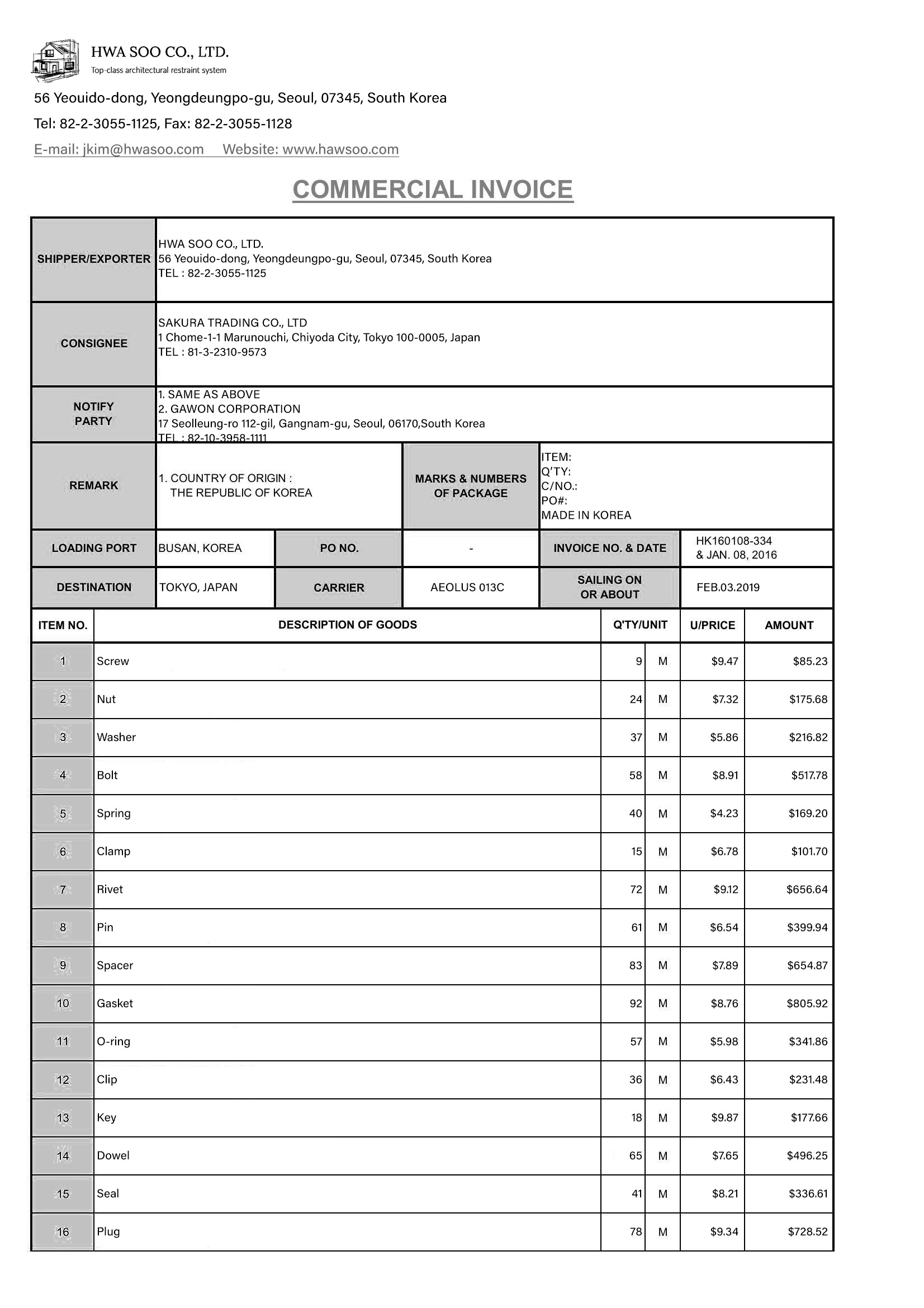
<figure>

![commercial-invoice.jpg](/assets/images/docs/commercial-invoice.jpg)

<figcaption><a href="/assets/images/docs/commercial-invoice.jpg" download="commercial-invoice.jpg">commercial-invoice.jpg</a></figcaption>

</figure>

**Request**

_Request/response examples: document-classification / request_

**Response**

_Example: document-classification / response-200 / default_