> For the complete documentation index, see [/llms.txt](/llms.txt).

> Source: /docs/capabilities/extract/universal-extraction

# Universal information extraction

## What is universal information extraction?

Universal information extraction is a capability that enables [key information extraction](/docs/capabilities/information-extraction) from any document type.
Unlike [prebuilt information extraction](/docs/capabilities/information-extraction/prebuilt-information-extraction),
which requires fine-tuning for specific document types, universal information extraction can process and extract key information from any random document without additional training or customization.

## Why use Upstage Information Extract?

- **Works with any document type**: Supports complex PDFs, scanned images, and Microsoft Office documents, ensuring seamless data extraction across various formats.
- **Schema-agnostic processing**: Can dynamically process and generate structured outputs based on any given schema, enabling on-demand customization for different use cases.
- **Extracts hidden and implied information**: Can extract not only explicitly stated information but also implied or inferred values, such as determining the total amount from multiple line items or identifying key details that aren’t directly labeled in the document.
- **No fine-tuning required**: Extracts relevant data without predefined templates or additional model training.

## What models does Upstage provide?

<table><thead><tr><th align="left" width="150px">Alias</th><th>Currently points to</th><th>RPS <a href="/docs/guides/rate-limits#information-extract">(Learn more)</a></th></tr></thead><tbody><tr><td>information-extract</td><td>[information-extract-260904](/docs/models/history#information-extract-260904)</td><td>1 (Sync) / 2 (Async)</td></tr><tr><td>information-extract-nightly (Experimental nightly model with early access to latest features. Updated frequently and may be removed without notice. Not recommended for production use.)</td><td>\-</td><td>1 (Sync) / 2 (Async)</td></tr></tbody></table>

[Extract Key Information in Upstage Studio!](https://studio.upstage.ai/library?lang=ko%2Cen\&steps=parse%2Cextract\&utm_medium=console\&utm_source=docs) — Identify and structure critical data from unstructured documents — ideal for automation beyond basic parsing.

## Sending a request in three simple steps

The Upstage Information Extract API is designed to follow [OpenAI Chat Completion API](https://platform.openai.com/docs/api-reference/chat/create)'s request and response formats. Users can use the OpenAI SDK to structure requests and handle responses accordingly.

### Add input files to `messages`

You can input a single file, which should be provided as URL or base64 encoded string in the `messages` field, formatted as follows:

```json
{
  "type": "image_url",
  "image_url": {"url": f"data:application/octet-stream;base64,{base64_data}"}
}
```

Requirements for the input file are:

- **Supported file formats:** JPEG, PNG, BMP, PDF, TIFF, HEIC, DOCX, PPTX, XLSX, HWP, HWPX
- **Maximum file size:** 50MB
- **Maximum number of pages per file:** 100 pages
- **Maximum pixels per page:** 200,000,000 pixels. (For non-image files, the number of pixels is determined after converting the file to images at 150 DPI.)
- **Supported character sets:** Alphanumeric, Hangul, Hanja, Katakana, and Hiragana are supported. Hanzi and Kanji are in beta versions, which means they are available but not fully supported.

> Hanja, Hanzi, and Kanji are writing systems based on Chinese characters used in Korean, Chinese, and Japanese writing systems. Despite sharing similarities, they possess distinct visual representations, pronunciations, meanings, and usage conventions within their respective linguistic contexts. For more information, see [this article](https://en.wikipedia.org/wiki/Hanja).

### Set schema in `response_format`

A schema defines the structure of the information to be extracted.
Instructions for writing a schema can be found [here](/docs/capabilities/extract/writing-a-schema).
An example schema is shown in the image below.

<figure>![schema-generate.png](/assets/images/docs/information-extract.png)</figure>

The schema can be provided in the `response_format` field.

```json
{
  "type": "json_schema",
  "json_schema": {
    "name": "some_document_schema_name_of_your_choice",
    "schema": {
      "type": "object",
      "properties": {
        "bank_name": {
          "type": "string",
          "description": "The name of bank in bank statement."
        },
        "transactions": {
          "type": "array",
          "items": {
            "type": "object",
            "properties": {
              "transaction_date": {
                "type": "string",
                "description": "Date on which each transaction occurred."
              },
              "transaction_description": {
                "type": "string",
                "description": "Description of each transaction."
              }
            }
          }
        }
      }
    }
  }
}
```

- `name`: Must be 64 characters or less and can include alphanumerics, underscores, and dashes.
- `schema`: Basically, a schema should follow the [JSON Schema Syntax](https://json-schema.org/overview/what-is-jsonschema). Read the [Writing a schema](/docs/capabilities/extract/writing-a-schema) page for additional details.

### Get the response

The response structure mirrors the [OpenAI Chat Completion Object](https://platform.openai.com/docs/api-reference/chat/object).
The extraction results are in the content of messages as stringified JSON objects.
It strictly follows the user input schema.

```python
import json
result = json.loads(extraction_response.choices[0].message.content)
print(result)
```

```json
{
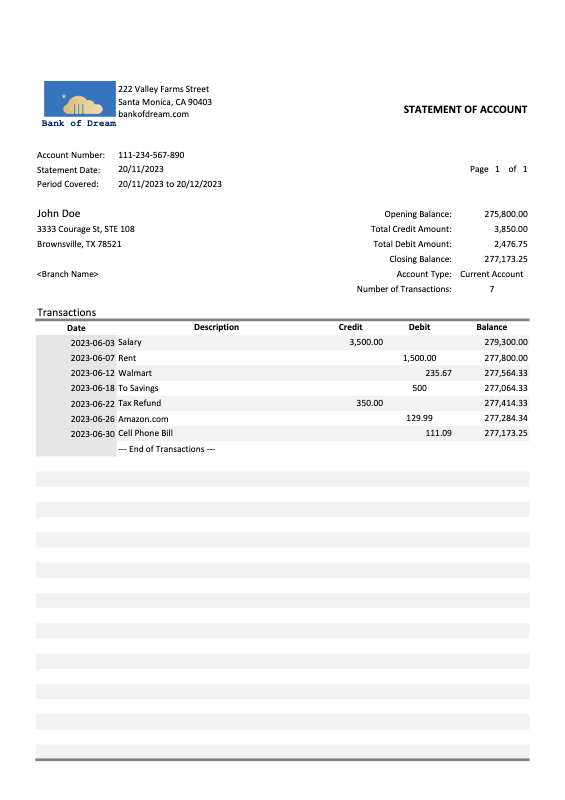
    "bank_name": "Bank of Dream",
    "transactions": [
        {
            "transaction_date": "2023-06-03",
            "transaction_description": "Salary"
        },
        {
            "transaction_date": "2023-06-07",
            "transaction_description": "Rent"
        }
    ]
}
```

## Examples

<figure>

![bank\_statement.png](/assets/images/docs/bank_statement.png)

<figcaption><a href="/assets/images/docs/bank_statement.png" download="bank_statement.png">bank\_statement.png</a></figcaption>

</figure>

### Simple extraction

Extract structured information from documents using a defined JSON schema.

**Request**

_Request/response examples: information-extract / request_

**Response**

_Example: information-extract / response-200 / default_

### Extraction modes (Beta)

Extract information from documents using different extraction modes.

- **Standard** (`mode: "standard"`) is the default extraction mode that provides fast and accurate extraction for most document types.
- **Enhanced** (`mode: "enhanced"`) is the extraction mode that offers improved robustness for challenging documents:
  - **Complex tables**: Better handling of nested tables, merged cells, and irregular table structures
  - **Poor quality scans**: Improved extraction from low-resolution or degraded document scans
  - **Handwritten text**: Enhanced recognition of handwritten content

> Enhanced mode incurs additional costs. See the [pricing page](https://www.upstage.ai/pricing) for details.

**Request**

_Request/response examples: information-extract / request / mode_

[Extract Key Information in Upstage Studio!](https://studio.upstage.ai/library?lang=ko%2Cen\&steps=parse%2Cextract\&utm_medium=console\&utm_source=docs) — Identify and structure critical data from unstructured documents — ideal for automation beyond basic parsing.

## Frequently Asked Questions

Check out frequently asked questions below. For more FAQs, visit the [FAQ page](/docs/resources/faq).

### Q. Can I request multiple documents at once?

We currently do not provide an interface for requesting multiple documents at once. \
We recommend sending images one at a time in series instead of sending multiple simultaneous requests. \
Sending many requests at once may result in a "429 Too Many Requests" error.

### Q. Is there an interface for filtering specific fields in the Universal information extraction API response?

We do not provide an interface to filter specific fields from the API response. We recommend that you extract the necessary field from the response JSON.

```python copy
# Example for filtering "store.store_address" from the receipt extraction API reponse
response = requests.post(url, headers=headers, files=files)
data = response.json()
addresses = [field['value'] for field in data.get('fields', []) if (field['key'] == 'store.store_address' and field['type'] == 'content')]
print(addresses)
```

### Q. Why am I getting '415 Unsupported Media Type' error during an API Request?

This issue occurs when the document format is not supported.
Check supported file formats for the API being used.

### Q. Why is the response time slow or delayed?

Temporary surges in usage can cause delays; check the status page.

**Details:**

- Monthly availability is maintained at over 95% under our [Service Level Agreement](/docs/terms/sla)
- Check [status.upstage.ai](https://status.upstage.ai/) for real-time updates

### Q. How can I increase the rate limit, and are there any conditions required?

Rate limits are automatically determined by your commitment tier. \
To increase your rate limit, purchase credits to upgrade your commitment tier — you can choose a one-time purchase, or monthly or yearly auto-recharge, at the [credit purchase page](https://console.upstage.ai/billing/credit). \
For details on each tier and its rate limits, see the [rate limits page](/docs/guides/rate-limits) or [upstage.ai/pricing/api](https://www.upstage.ai/pricing/api). \
If no commitment tier covers the limits you need, [contact us](https://www.upstage.ai/contact-us?utm_medium=console\&utm_source=docs\&utm_content=faq) with your requirements.

### Q. Why am I getting '429 Too Many Requests' error during an API request (rate limit)?

Rate limits are restrictions set by our API on how frequently a user can make requests within a given time frame. \
For detailed information, please refer to the [rate limits page](/docs/guides/rate-limits). \
If you encounter 429 errors, reduce the frequency of your requests and try again after a few seconds or a minute. \
To raise the limit itself, upgrade your commitment tier by purchasing credits at the [credit purchase page](https://console.upstage.ai/billing/credit).