What is document parsing?
Document parsing is a process of automatically converting any document to structured text such as HTML or Markdown. It detects layout elements such as paragraphs, tables, images, and more to determine the structure of the document. The API then serializes the elements according to reading order, and finally converts the document into structured text.
Try Document Parsing in the Playground!
✓ Convert documents to HTML or Markdown
✓ Use a sample or your own file
✓ No API key needed - free to try
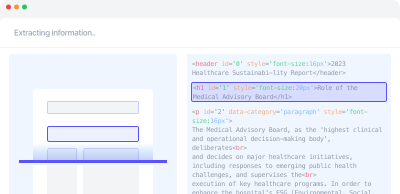
Example use cases
- RAG Pipelines: Build RAG pipelines that store unstructured documents in a database while preserving their structural information.
- Document QA: Power Document QA by extracting information from tables, charts, and other elements within documents.
- Document Automation: Enable various document-based tasks including chatbots, summarization, information extraction, and document processing automation.
Getting started
Choose sync or async
The synchronous API is suitable for most use cases and supports up to 100 pages per request. See API Quickstart for examples. For documents over 100 pages, you can either split them into chunks and use the synchronous API, or use the asynchronous API which supports up to 2,000 pages. See Handling large documents for both approaches.
Select a mode
Document parsing provides three modes. Use standard for text-focused documents with simple tables. Use enhanced for documents containing complex tables, images, charts, and other advanced visual elements. Use auto to automatically classify pages as either standard or enhanced and process them accordingly. Note that enhanced and auto modes are available from document-parse-260128 and later versions.
Send a request
Refer to the API Reference to send a request. For input constraints, see the Input requirements section.
Receive the response
For sync requests, the parsing result is returned immediately. For async requests, a request ID is returned, which you can use to retrieve the result later. For detailed information about the output format, see Understanding output.